As a whole, the new WordPress Admin panel is organized fairly well, however when it comes to editing posts or pages quickly without having to open each post or page in a new tab or window, it isn't a very efficient process. For those who are using WordPress as a CMS, it's important to be able to manage contents easily and quickly. That's what this plugin helps to do.
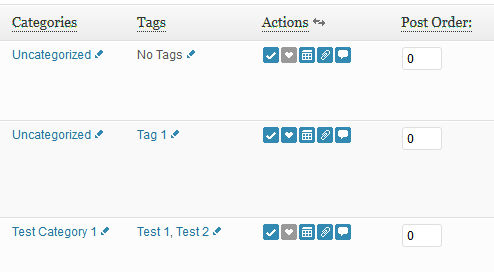
It adds some icons to the posts/pages management panel with AJAX-driven CMS-known functions like toggling post/page visibility, changing publication date and title without having to open the edit screens or reload the page, plus changing page order with drag'n'drop, inline category management and inline tag management, plus much more.
- Ability to change post and page properties inline in the post or page management view
- Toggle visibility with a single click
- Quick Edit for Taxonomies (Categories, Tags, Custom Taxonomies, ...)
- Quick Edit for Custom Post Types (Title, Slug, Author, etc.)
- Stick & unstick posts with a single click from within the posts listing panel
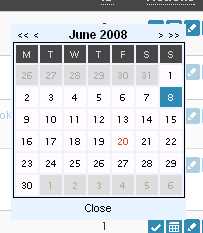
- Change the publication date with a neat comfortable calendar
- Change post/page title inline in posts/pages management view
- Change post/page slug inline in posts/pages management view
- Change page order inline in pages management view
- Change order of (top level) pages via Drag'n'Drop
- Change categories inline on post management page (inline category management)
- Toggle comment status open/closed in posts/pages management view
- Change tags inline on post management page (inline tag management)
- Change media order inline in media management view
- Change media description inline in media management view
- Open post revisions inline in post/page management view
- Change post/page author inline in post/page management view
- Change link categories inline on link management page
- Toggle link visibility with a single click
- Time now can be chosen in the js popout calendar aswell
- Change post order inline in post management view (Props Jeff Cole
- Support for Exclude Pages plugin
- Entirely possible to be localized, including the JS calendar
- Two different button sets available
Notes on changing page order via Drag'n'Drop
Since Version 1.0 it is possible to change page order via drag'n'drop. Currently it's only possible to drag top level pages, that means only those pages with no parent pages. It is planned to make it possible for child pages, though.


As an admin, I’m not able to change the author of posts and pages in WordPress 3.2.1. Not sure what the reason is. Can you please help? This works in another site of mine (which run WP v3.2)
As an admin, I’m not able to change the author of posts and pages in WordPress 3.2.1. Not sure what the reason is. Can you please help? This works in another site of mine (which run WP v3.2)
Are you having more than 1 author in your blog that’d be allowed to be a post author?
Yes, I have more than one author in my blog that can post a post author.
Can you send me an admin login so I can have a look at it myself? scripts (at) schloebe (dot) de
If I want to use data in the “Post Order” column for sorting Feature Slide ordering, where do I find the data in a table? What would the variable be to query?
If I want to use data in the “Post Order” column for sorting Feature Slide ordering, where do I find the data in a table? What would the variable be to query?
Not sure what exactly you’re trying to do, but the post table row for dates is post_date.
Hallo, erstmal vielen Danke für das tolle Plugin.
Ich habe ein kleines Schönheitsproblem in einem meiner Themes bei Verwendung von Admin Management Xtended, das die Funktionalität ansonsten nicht berührt.
Unter “Kategorien” und “Schlagwörtern” taucht auch “ame_cat_actions” und “ame_tag_actions” auf.
Wie kann das sein? Eine Idee, wo ich am schnellsten nachgucken könnte? Ansonsten werden die Kategorien und die Schlagwörter aber korrekt angegeben und sind auch editierbar in der tabellarsichen Übersicht.
Ich habe es bewusst nicht als Bug gemeldet, da wohl nur ich dieses Problem habe. Stattdessen habe ich alle 5 Sterne bei wordpress.org gegeben.
Gruß
Jürgen
Hallo Jürgen,
sorry, ich verstehe nicht ganz, was du damit meinst. 🙂 Du meinst, dass die Backend-Actions “ame_cat_actions” und “ame_tag_actions” bei dir auch im Frontend auf den “Kategorie”- und “Schlagwörter”-Seiten auftauchen?
Hi Oliver.
I like to see the time, not just the date, for a post in the list.It would come in handy when You publishes more than one post a day and sets future date and time for publication.
It would be perfect because You can change both the date and time for publication of an post with Admin Management Xtended.
Thanks
Dan
Hi Oliver!
http://lecactus.ru/download/wordpress/plugins/admin-management-xtended-ru_RU.zip – this is updated (to version 2.2.4) RUSSIAN language pack.
Thanks Lecactus, added your localization to the repository!
Any plans to be able to edit the list of custom taxonomies as well as the standard categories and tags?
Fantastic plugin! a real boon!
Could you please add a feature to load more pages onto the admin page? I manage a large site with hundreds of pages, and it’s nearly impossible to do any meaningful admin with only 30 pages loaded.
Also, could you add a function to collapse child pages under the parents?
Cheers!
Hey Benny,
showing more than 30 pages per page is already in WordPress core. On the page listing page, click “Screen options” on the upper right.
For some reason, in the order direct input field, if I press “tab”, then it updates via AJAX, but if press “Enter”, it alerts “Error on saving page order”, then it disappears and updates correctly. Any idea what that is? Also, is drag-n-drop available for page-like custom post types?
Hello there,
great plugin THANX! I’ll give you 5 stars!
I have an off topic question, I like your admin pannel (saw it in the video) with the tabs on top, which plug-in is that?
Thanx a lot
V.
Hey valentina, that’s not a plugin, that is how WordPress 2.5 looked like when I made the video some years back. 😉
this plugin is very good. thanks for create and share
Very cool Plugin. Only downside i could find: the url-params are somewhat too long for older browsers (i have a client who’s forced to use FF 3.x, yeah i know) who cannot handle such long urls. is that something than can be fixed (e.g. can those params be send as POST-data?)
i have put an example of the params here: http://jsfiddle.net/michapixel/UgD4w/
Can you name a particular example? I’m using WordPress’ standard AJAX interface (SACK) so using GET seems to be the only option available with that framework as far as I can see.
the only way i know – this is more a guess – http://technosailor.com/2012/02/08/tutorial-using-wordpress-ajax-api/
Heh, no, I was meaning an example in the WP admin area where my plugin is sending an AJAX request whose url is too long to handle for older browsers. Just trying to reproduce the issue. 🙂
http://jsfiddle.net/michapixel/UgD4w/ this is the url bloated by get-params. it’s a result of a search within “manage”
So you don’t mean AJAX urls are being too long, but the URL when searching posts in the admin area? I doubt I can change much about it as this is a default WordPress feature. I can, however, try to get rid of the GET params that are being caused by my plugin. 🙂
A quick option would be to open the “Screen options” panel (top right of the screen) and decrease “Show on screen” to display less posts per page.
Version 2.3.1 should be fixing the issue. 🙂
@Oliver: very cool, thanks in advance.
Are you able to manipulate the /categories/ and /tags/??
you mean the permalinks?
You mean the category and tag base? You can change these in the settings.
Hi,
I tried the direct input post order, so I key in the order number, but it doesn’t appear to have any effect on the post order at all
for example in this link http://www.suttavinaya.com/category/advanced/nikaya-album/
If it ordered correctly it should display like this;
Contents
Album Introduction
Disc 1 Anguttara Nikaya
…2,3,4…
…
Disc 9 Khuddaka Nikaya
Refrences
But as you can see, its all jumbled up.
What has gone wrong?
Fyi, I tried this with twentyelenen theme as well and its still not working
Thanks & regards
Hey Eric,
in order to make post order work you’ll have to edit your Loop a little bit. Altering the orderby parameter to ‘menu_order’ in query_posts() should do the trick: http://codex.wordpress.org/Class_Reference/WP_Query#Order_.26_Orderby_Parameters
Which file do i have to edit?
Usually your theme’s index.php file.
here is the index.php sourcecode, but there is no query_post
———————————————————————————————-
max_num_pages; if ( $total_pages > 1 ) { ?>
<?php next_posts_link(__( '« older articles’, ‘clean’ )) ?>
<?php previous_posts_link(__( 'newer articles »’, ‘clean’ )) ?>
<div id="post-” >
<a href="” title=”” rel=”bookmark”>
<a class="url fn n" href="” title=”display_name ); ?>”>
|
<abbr class="published" title="”>
<?php edit_post_link( __( 'Edit', 'clean' ), " | \n\t\t\t\t\t\t”, “\n\t\t\t\t\t” ) ?>
<?php the_content( __( 'continue reading »’, ‘clean’ ) ); ?>
<?php wp_link_pages('before=’ . __( ‘Pages:’, ‘clean’ ) . ‘&after=’) ?>
|
<?php the_tags( '’ . __(‘Tagged ‘, ‘clean’ ) . ”, “, “, “\n\t\t\t\t\t\t | \n” ) ?>
<?php edit_post_link( __( 'Edit', 'clean' ), " | \n\t\t\t\t\t\t”, “\n\t\t\t\t\t\n” ) ?>
max_num_pages; if ( $total_pages > 1 ) { ?>
<?php next_posts_link(__( '« older articles’, ‘clean’ )) ?>
<?php previous_posts_link(__( 'newer articles »’, ‘clean’ )) ?>
Sorry it seems the code gets altered if i post it here
but here is the link to the source code of index.php;
http://www.suttavinaya.com/tmp/sc.txt
Try this: http://pastebin.com/NqwFpiXu
Thank you, for being so helpful. Unfortunately, that didn’t make a difference, the posts still would not order.
I have a field in the admin for the “type” of post. I really need to be able to update this inline as I have a site that Im updating to use custom post types. How can I add that functionality?
In the video, the admin panel displays posts, categories, tags and more in a tabbed view. How do I configure my admin panel the same way? I only see Pages or Posts in a single view in my panel.
Does your plugin manage categories and tags? The standard view has no sort option, as one example. I’d love to see your plugin extended to the actualy tags & categories admin panel.
Thanks for a great plugin!
Zena
The video has been shot with WordPress 2.5 or so. Quite old. 😉
OK; it’s an older version. Thank you.
Is there any way to add your plugin features to the standard WP admin panel view for categories and tags. I have many that need better management than the standard panel provides.
You could ask the WordPress people for inclusion! Other than that, just install the plugin to have the improved management options in your installs.
Hello,
Thank you very much for this great work.
This plugin is very good.
When it will be possible to order Posts like pages, with drag and drop, I will vote with 6 stars!
Hi , I just wanted to say thanks for the plugin. It came in very useful recently, when I had to change the postdate on a large number of posts.
It would be great if some of these features came as standard.
Anyway thanks again.
Cheers
I love your plugin! I’d love to see the ability to add tags to media without having to open each image.
You can’t add tags to media with standard WordPress. Are you talking about a plugin?
Great plugin! I’d like to bulk edit the date of publication of posts. For example, I want me to have 50 posts on one date and time of publication. Possible to implement it?
Hey Oliver,
I’ve been using AMX for a while now and although I used to find it really useful, the rather degraded support for CPT makes it a bit tricky to use nowadays.
The feature I get asked the most by the clients is drag&drop functionality for CPT with capability_type set to ‘page’. Is it a complex update?
Another thing is with CPT support for Categories or Tags. When these two are enabled, AMX overrides corresponding columns containing incorrect links, e.g.:
instead of http://site.com/wp-admin/edit.php?category_name=general&post_type=cpt_name it links to http://site.com/wp-admin/edit.php?category_name=general
You think it’s fixable at some not too distant future?
Just wondering why the plugin changes all the post authors to guest-user when they are already marked with their respective author? Is there a way to leave the original author name as it is instead of having to reset them all again? Thanks.
bhess
How do I turn off Drag and Drop. After I turned it on the buttons disappeared. Thanks for your help.
This is one of the best wordpress plugins out there. It should be standard on wordpress! Thanks for making it.
Im looking for a plugin to bulk edit POST CONTENT instead of anything else. Any ideas? Any plans to add POST CONTENT edit function to Your plugin? 🙂
please advice.
We got a similar problem to that one of Mendel above. WordPress 3.5.1 german, all other plugins disabled. Admin Management Xtended 2.3.8. When trying to save the new post order, a message appears: “Ajax error on saving page order”. But, unlike Mendel, nothing is changed after the wheel spinned for some seconds. Could it be due to the fact we got the same order numbers several times? Need login for check?
ã¯ã„ã€ã‚ã‚ã€ã»ã¨ã‚“ã©ã™ã¹ã¦ã®å°å³¶å¶¼å›½ã§ã¯ã€ç”Ÿã残るãŸã‚ã«ã¯ã€æ”¯æŒè€…を探ã—ã¦ã¾ã™ã€‚沖縄ã¯ç‹¬ç«‹å¾Œã€èª°ã«é ¼ã‚‹ã“ã¨ã¯ã€ã«è¡Œãã®ã§ã™ã‹ï¼Ÿ
I really like this plugin, it adds a lot of nice subtle improvements to workflow. Unfortunately the one thing I downloaded the plugin for it seems it doesn’t do. I wanted an easy way to manage categories inline when using WooCommerce products, however the inline category editing seems like it’s only available for the standard wordpress categories but not for custom taxonomies. It would be great if you could add inline editing support for custom taxonomies or at least for product categories in WooCommerce. Alternatively some other clever solution for quickly editing categories for hundreds of products (I’m mainly looking removing a bunch of extra categories from selected products after adding new ones using the WP bulk edit).
Hey Lars,
added to my TODO. 🙂
Hi Oliver,
Just added WooCommerce to my own site (been working for clients) … and my product list is messed up big time! I needed to sort the products and the cat’s
Any ideas on time?
Hi Peter, sorry for the late reply. May you please provide a screenshot as for what looks messed up? Thank you!
Not getting any functionality on Custom Post Types – there is some text “Edit Post Order” followed by a button “OFF” and another “Direct Input” but the only refresh the admin page. Is there a requirement when registering post types? The theme has 3 CPTs is not working in any of them.
Any suggestions would be much appreciated.
Thanks
Ernie
Hey ernie,
custom taxonomies and custom post types are not yet supported, but are on my TODO.
Got a couple of things on my todo too,
Thanks for the reply
Great name … and great plugin!
I’ve seen several people ask about this but not recently so I figured I would make a stab at the question again. I’m using Easy Custom Post Types to create custom post types, custom taxonomies and custom fields for my website. I’m also using Post Types Column Editor to allow me to select which columns I want to appear on my custom post type management view pages.
My hope was to display relevant data on a management view page and to allow the admin to easily edit the data inline directly on the management page. I was super excited to find your plugin but after installing it I realized that it doesn’t provide the functionality I was after as far as performing inline edits on custom fields. I know others have asked you about this as recently as 9 months ago and at that time you responded that you were looking to add this to a future version. I’m curiously crossing my fingers hoping that you have such a version available? If not, are you looking for freelance work to get this functionality added to my website?
Thanks,
Oliver
Hey Oliver,
your parents must have been poets. Such a wonderful name yourself. 😉
Regarding the plugin.. sorry to say, but I currently am und will be for the next few months busy on a huge project, so I’m not having much time for volunteer WordPress work. Anyone interested, however, is free to fork the Github repo, and contribute: https://github.com/AlphawolfWMP/admin-management-xtended 🙂
Hi, powerful plugin, i need the same for manage taxonomies fast, i have 3600 product categories after i imported a xml and i like to manage them with parent-child,
is tere a ajax way to order the parent without reload the page?
thanks
Stathis
Could you help me, please ?
I need that the posts must sorted by parameter that available in admin page in right column (“post order”). I know that I need to change small string in index.php
query_posts( ‘orderby=******&order=ASC’ );
****** = WHAT ? What name this parameter (post order #) have ?
Hey Sergey, do not edit WordPress core files! 😉
awesome extensions and it visually fits perfect to wordpress!
Es gibt zwei Dinge, die mich im WP Admin stören und für die ich keine Lösung finde. Vielleicht ist ja hier jemand so nett:
1. Im Admin-Bereich möchte ich posts nach Views sortieren (wie ich das aus Joomla kenne).
2. Beim bearbeiten von mehreren Posts einer Kategorie muss man entweder immer neue Tabs öffenen oder man landet stets wieder in der vollständigen, nicht in der zuvor gefilterten post liste.
Wäre schön, wenn jemand helfen könnte…
Merci
Hey Stephan,
1.) Nach Views sortieren müsstest du beim Plugin-Autor nachfragen, denn Viewszähler gibt es standardmäßig nicht in WordPress.
2.) Das verstehe ich nicht ganz. Meinst du die Massenbearbeitungsfunktion von WordPress?
Not a support question, just a huge thumbs up to this plugin!
I’m constantly re-building my WordPress run websites (just doing one now in fact!) and this is one of those ‘must-have’ plugins I go and install first.
Thanks for making site administration less of a hassle 🙂
You’re welcome, Gemma! Glad you find the plugin helpful. 🙂
The “description” column isn’t sortable (in the Media Library) and the words aren’t searchable. Is there a way to change either of those things (future upgrade)?
hello, thanks for this plugin. I have a question: I am too experiencing issues with the products page of the woocommerce plugin when this plugin has been activated.
has there been any change about that so far?
thank you
May you please reply a screenshot of the woocommerce products page?
Great plug-in. The only thing missing is the “delete/trash” function. If that would be added to this plug-in – it would make the all-time best ever.
I did find a plugin that states that feature [Swift Page Manager] – but, does not seem to work at all with the latest wp version.
Just a suggestion maybe to consider.
Thanks for your excellent work!
Hi Michele, WordPress already has a (mass) trash/delete function built-in so my plugin doesnt need to add it.
Use this plugin all the time as one of my “go to first plugins”! Can the plugin handle more than 999 posts? I notice that the post order field can only take up to 999? I am building an ecom site that will have well over 1000 products which all need to be in order.
Thank you for your plugin…….It rocks!
Hi John, just released version 2.4.0.1 that removes the maxlength attribute. Technically the plugin can handle more than 999 posts.
When will there be an update so that it is accurate again?
I currently have 18 plugins that all show non-compatibility with 4.5 when ALL of them are compatible.
At this time…I definitely won’t be depending on this for accuracy.
Talking about another plugin perhaps? 🙂
Hi Oliver,
Love your plugin and have used it for quite a while now. But after upgrading to PHP 5.6 this plugin appears to be breaking the “Add Media” functionality in new posts. When we create a new post and click the “Add Media” button we just get a spinning wheel and no images ever appear. The wheel just spins forever. If we click on “Media” in the left-hand menu panel the media library loads just fine. We just cannot add media to posts.
I disabled all of our plugins and re-enabled them one by one to isolate Admin Management Xtended as the culprit. As soon as I enable AMX we lose the ability to add media to posts.
Any idea how/why this is happening and if there might be a fix?
Hi Jeff,
I just tested on WP 4.5.3 with Admin Management Xtended 2.4.0.1 enabled and it works fine for me. What WP version are you running?
If you’re using Firefox, Chrome or Internet Explorer, please press F12 (https://developers.google.com/web/tools/chrome-devtools/iterate/inspect-styles/shortcuts#accessing-devtools) to open the developer console, then click on the “Add Media†button in WP and copy-paste the output from the developer console please.
Hi Oliver,
Thanks for the reply. I’m slow to respond because I was out on vacation the past several days.
I am on 4.5.3.
This is from the “console” tab:
JQMIGRATE: Migrate is installed, version 1.4.1 load-scripts.php:9:542
Prefixed Fullscreen API is deprecated. Please use unprefixed API for fullscreen. For more help https://developer.mozilla.org/en-US/docs/Web/API/Fullscreen_API load-scripts.php:409:6458
Deprecated TinyMCE API call: .onNodeChange.add(..) wp-tinymce.php:22:76
This site appears to use a scroll-linked positioning effect. This may not work well with asynchronous panning; see https://developer.mozilla.org/docs/Mozilla/Performance/ScrollLinkedEffects for further details and to join the discussion on related tools and features!
Hi Jeff,
thanks for the console output! The culprit here is this line “Deprecated TinyMCE API call: .onNodeChange.add(..) wp-tinymce.php:22:76”. Do you happen to have another plugin installed related to the TinyMCE editor? Also, check here for more steps on how to Troubleshoot Visual Editor Issues.
I honestly don’t know. I inherited this Website and it has dozens of plugins. Is there an easy way to determine if a plugin is related to the TinyMCE editor? Did you intend to post a link with the “check here for more steps” or did you just mean search your site?
Thanks for the help.
Oh sorry Jeff. Here’s the link: https://wordpress.org/support/topic/how-to-troubleshoot-visual-editor-issues
Well, as for determining if a plugin is related to the TinyMCE editor, the plugin name should be obvious, such as “TinyMCE Reloaded” or “More TinyMCE buttons”. If it’s ok for you to grant me a temporary admin account for your site I could review your plugins myself to find the possible culprit.
Thanks for the offer, man! Let me take a stab at it first and see if I can see anything obvious. If I can’t find anything I’d be more than happy to take you up on your offer.
Will let you know what I find, if anything.
Thanks!
I found one plugin with “Tiny” in the name – TinyMCE Advanced. I disabled it, re-enabled AMX and I was then able to use the “Add Media” button in a new post. Enabled TinyMCE Advanced and it broke again. So is it a conflict between the 2 plugins or is that plugin ‘defective’?
Well, AMX doesn’t touch the TinyMCE in any way, so I wouldnt know how it could be conflicting with TinyMCE. Is there an update for TinyMCE Advanced available?
Just for clarification: The Add Media button stops working only when both the AMX and TinyMCE Advanced are enabled at the same time? With AMX disabled and TinyMCE Advanced enabled it works fine?
I have the latest version of TinyMCD Advanced – 4.3.10.1.
You are correct:
1. With AMX enabled and TMCEA enabled, “Add Media” button functionality is broken.
2. With AMX disabled and TMCEA enabled, it works
3. With AMX enabled and TMCEA disabled, it works
This is after upgrading to PHP 5.6. They both lived together happily before the upgrade from 5.2.17
And just to clarify, by “broken” I mean that when I click on the “Add Media” button the media library window opens but no media ever appears. I have a spinning gray wheel at the top of that window that just spins forever. I can send a screenshot if you’d like. Or if there’s anything else you’d like me to send you just let me know.
Ok, I will test both plugins being enabled at the same time in my test environment tomorrow (its almost 11pm here). Maybe I can find a workaround or solution. 🙂
I just tested in my test environment using WP 4.5.3, AMX 2.4.0.1 and TMCEA 4.3.10.1 with both AMX and TMCEA enabled, and it’s working fine.
I just realized that one can export settings of TinyMCE Advanced on the settings page, so would be please export your TMCEA setting and provide them to me so I we share the same settings?
Here ya go:
{“settings”:{“toolbar_1″:”bold,italic,blockquote,bullist,numlist,alignleft,aligncenter,alignright,link,unlink,fullscreen,undo,redo,wp_adv”,”toolbar_2″:”formatselect,alignjustify,strikethrough,outdent,indent,pastetext,removeformat,charmap,wp_more,forecolor,subscript,superscript”,”toolbar_3″:””,”toolbar_4″:””,”options”:”advlist,contextmenu,menubar”,”plugins”:”anchor,code,insertdatetime,nonbreaking,print,searchreplace,table,visualblocks,visualchars,advlist,contextmenu”},”admin_settings”:{“options”:””,”disabled_plugins”:””}}
Hi Jeff, thanks for the settings. Sorry/Happy to say that even with the settings applied and both AMX and TMCEA enabled at the same time, the “Add media” button just works fine for me. :/
Do you happen to have an ad-blocker enabled?
Hi Oliver,
No ad-blocker plugin. It’s clearly not an AMX problem. I’m just going to leave TinyMCE Advanced disabled for the time being. Maybe at some point down the road a TMCEA update will knock this problem out. Just glad to have AMX back!
Thanks a million for all your help!
With WP 4.6 released yesterday, you could try updating WordPress. If you’re lucky the update is shipping an updated version of TinyMCE. I also noticed there’s an update of TMCEA available that requires 4.6+.
Thanks for the heads up! They just released the TMCEA update yesterday. I’ll update WP and TMCEA in the morning and let you know if that resolves anything.
Well, a simple WP update turned into a big hassle! The long & short of it is that I updated to 4.6 and at the same time updated to the new TMCEA. Checked the site and saw that I was getting a fatal error on every page. After much fruitless troubleshooting I rolled back to WP 4.5.3 but kept the newest version of TMCEA (which displays a notice at the top of the plugin page that this version of TMCEA is only for WP 4.6 and may be unstable on this version). Now, after all that, AMX and TMCEA are activated and living happily together again! I haven’t seen any problems with my ‘outlaw’ version of TMCEA…yet.
So all appears well now.
Glad to hear it all turned out well after all the hassle, Jeff. 🙂
As an admin, I am not able to BULK change/remove categories from post listing. This would be another feature of your very useful plugin, Oliver. I respectfully ask you to add this functionality. Currently I am unable to remove one or more categories massively. I have to go one by one, which consumes in an old site, a very long time.
And just to improve it for readability in relatively small screen sizes, also when in post listing view, the title of the post should be in one row, and then all the others fields, including your actions, in a second row. Or, just all your actions, in a second row. I comment this because it is very hard to read long post titles when I added your Actions column (as per activating this plugin).
Please, take all my comments having much respect and grateful for your hard work! Cheers!
I just installde the plugin and it looks great. Many thanks to you good sir 🙂
One suggestion would be some icon to edit page with the page builder of your choice (I use Elementor and would like to be able to edit with one click)
Also I haven’t figured out how to drag and drop pages yet. But I will keep looking.
Thanks!
Oh, how stupid of me. Please ignore my last post about edit with page builder… Do keep the thanks though 🙂