Occasions Plugin


Aktuelle Version: 1.1 | Bisherige Downloads: [total=occasions] / [download#19#hits]
SVN Download
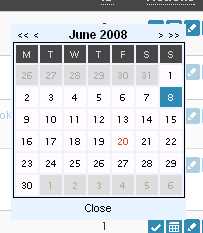
Mach es wie Google! Ähnlich Google's Tradition, seine Logos zu diversen Anlässen wie Weihnachten oder Silvester zu ändern, bietet das Plugin Occasions die Möglichkeit, Text oder HTML zu angegebenen Daten einzublenden bzw. anzuzeigen. Die Anlässe können bequem in einem komfortablen AJAX-Interface eingepflegt und gelöscht werden. Je nach dem aktuellen Datum werden sie dann wieder ausgegeben.
Anforderungen
Das Plugin benötigt WordPress 2.5+, unterstützt 2.6 bis 2.8+
Features
- "Date Dependencies" beim Einstellen des Start- und Enddatums
- AJAX-Interface zum Verwalten der Anlässe
- Objektorienterter Code
- Unterstützt das Verschieben/Umbenennen des wp-content/-Verzeichnisses seit WP 2.6
- Vollständige Lokalisierungsmöglichkeiten für das Plugin, inkl. JavaScript-Kalender
Installation
- Downloaden Sie das Plugin und entpacken Sie es.
- Laden Sie den entpackten Ordner occasions/ in den /wp-content/plugins/ Ordner hoch.
- Aktivieren Sie das Plugin im WordPress Administrationsbereich.
- Fertig die Installation.
Upgrade
- Deaktivieren Sie das Plugin im WordPress Administrationsbereich.
- Laden Sie den entpackten Ordner occasions/ in den /wp-content/plugins/ Ordner hoch und überschreiben die alte Version.
- Aktivieren Sie das Plugin im WordPress Administrationsbereich.
Implementierung
Um die Liste der heutigen Anlässe auszugeben:
Um die Ausgabe in eine Variable zurückzugeben:
Außerdem steht ein Shortcode zur Nutzung bereit:
[Occasions]Entwicklung
Screenshots


Screencast
Siehe hier.
Support
Bei Fragen, Anregungen oder Kritik zum Plugin bitte entweder das Forum, die Kommentare oder das Kontaktformular nutzen.
Changelog
08.05.2009 - version 1.0.1
- Änderung der Datenbank-Kollation zur Vermeidung von Zeichensatz-Problemen auf einigen Systemen
22.02.2009 - version 1.0
- Plugin Release
English Version
Latest version: 1.1 | Downloads: [download#19#hits]
SVN Download
Do it like Google! Just like Google change their logos on certain occasions such as Christmas or New Year's Eve, the Occasions plugin offers the possibility to display text or HTML on specified dates. The occasions can be easily managed by a fancy and comfortable AJAX-Interface.
Requirements
The plugin requires WordPress 2.5, supports 2.6 and 2.7+
Features
- "Date dependencies" on chosing start and end dates
- AJAX interface for managing the occasions
- Object-oriented code
- Supports changing location/ renaming of wp-content/ folder with WP 2.6
- Entirely possible to be localized, including the JS calendar
Installation
- Download the plugin and unzip it.
- Upload the folder occasions/ to your /wp-content/plugins/ folder.
- Activate the plugin from your WordPress admin panel.
- Installation finished.
Upgrade
- Deactivate the plugin from your WordPress admin panel.
- Upload the folder occasions/ to your /wp-content/plugins/ folder and overwrite the existing file.
- Activate the plugin from your WordPress admin panel.
Usage
To display the list of current occasions, use:
To return the output of current occasions, e.g. to load into a variable, use:
There is also a Shortcode available:
[Occasions]Development
Screenshots
Screencast
See here!
Support
For questions, suggestions or issues with the extension please use the forums, comments or the contact form.
Changelog
08.05.2009 - version 1.0.1
- Changed database collation to fix issues on a few systems
22.02.2009 - version 1.0
- Plugin released

Hello Oliver,
First, thank you for a great WP plugin Occasions. The idea is awesome, I’m just having a small problem. My site is in utf-8 coding and it gets messed when occasions are being displayed in other language than English (Polish e.g.) – I tried to convert Occasion files to utf-8 but it didn’t help. Do you have any idea how to solve it?
All the best,
Gleb
Hey Gleb,
do you have an example URI to show? And are the strings correctly displayed in the admin interface?
Oliver
Hallo Oliver,
ich benutze dein Plugin auf der Startseite von ZurLageDerNation.info ganz oben links. Im Moment steht dort “Krisenkultur”, aber ich bin froh, dass ich das nun dank deinem Plugin vom Backend aus bequem ändern kann. Tolles Plugin.
Viele Grüße,
Alex Fink
Hi !
Gibt es irgendwann ein Update so das man das Plugin auch für die WordPress Version 3.+ verwenden kann oder ist das nicht möglich ?
Gruß Marlis
Hallo Oliver,
wird es auch möglich sein, Bilder/Grafiken mit einzubinden? Dann wäre es richtig “like Google” 😉
Das ist bereits möglich. Einfach “HTML” auswählen, dann kann man auch img-Tags etc. nutzen. 😉
Ein gutes Plugin,werde es mir einbauen.
Hi! I could have sworn I’ve been to this site before but after checking through some of the post I realized it’s new to me. Anyhow, I’m definitely happy I found it and I’ll be book-marking and checking back frequently!
usually people are not enough to speak on such topics. To the next. Cheers
You’ll Never Get Good Tattoo Designers If You Keep Doing These Three Things It makes little or no sense to have a great custom tattoo design in mind which doesn’t see the light of day. If this happens and someone else comes along and brings the same idea to fruition, naturally, you’re going to resent it, though the fault may well be yours. Fortunately, we have scores of talented tattoo designers we can rely on, and you would surely want to engage the more skilled and creative, rather than middle of the road tattoo designers. Before you engage the best in the tattoo industry, there are three things you should never do: Don’t look for tattoo artists in the yellow pages: Instead, if you are trying to find the best tattoo designers, word of mouth advertising is perhaps a good way of doing it, but just because an artist’s reputation precedes him doesn’t mean he’s the one for you. However, there is a good way out if you do want to hire the best in the field. All you do is to create an online tattoo design contest. Here, you post your idea for a custom tattoo design and, by doing this, you not only open doors of opportunities for yourself but also for tattoo designers. When you create a tattoo design contest, you lay a great premium on the design’s artwork that you find eyecatching. The artist who wins the contest will get the prize after he sends the contest host a stenciled form of the prizewinning tattoo design. If you’re keen to know more about online competitions, just log on to your pet site. Give the prize you promise: By now, you’ve learned that an online contest is the best means of getting in touch with top of the range tattoo designers. If you know this, your next step is to ensure that you deliver what you promisei.e. the prize money to the winner. Your contest might have raised the hopes of many artists who, with their creative excellence, hope to win the contest. So, don’t dash their hopes by not giving them the promised prize that you stated in the details of your contest. If you don’t, you’ll incur some bad press. If you do earn a bad name online, you will find it difficult to continue to do business on the Net in future. Price your prize attractively: For online tattoo design contests, the least prize amount you can award is $35. However, if you want to attract a better class of designer, you need to peg it a little higher than that. But if you do give out the minimum $35 prize, your prize won’t attract many artists and you will be known as someone who doesn’t pay more than the minimum. If, however, your prize money exceeds $100, ensure that you do, in fact, give out the promised prize money to the winner. Else, you’ll incur the ire of letdown artists who will post angry comments on your wall. So, when hosting an online tattoo design contest, be very careful. Kristen Dunn is a tattoo enthusiast and professional tattoo designer who has created thousands of thought provoking, elegant, and funky tattoos for her clients. She has a vast collection of custom designs to her credit. Winner of several awards and accolades, Kristen is now a founding member of the world’s largest custom tattoo design community at CreateMyTattoo. View her tattoo collection or read more on her blog here.
¥Ë¥å©`¥Ð¥é¥ó¥¹ ¥¹¥Ë©`¥«©` ¥ì¥Ç¥£©`¥¹ http://www.bosungsci.com/common/newbalancesneaker-62.html
What’s Behind Those Colorful Neon Lights? You might have seen those bright colorful neon lights shining everywhere. They attract people’s eye toward shops, bars, cafes and a lot of place after the sunset. Many business people are happily gaining the attention of their potential customers these days with this easily maintained custom made sign boards made up of neon lights. We might be cluedup about the uses and benefits of these affordable decorative lights and sign boards but here is a little about the workings of them. The atoms of rare gases like helium, neon and argon don’t form stable molecules by means of chemical bonding with the other atoms. One notable thing here that it’s quite simple to assemble a gas discharge tube like a neon light that gives out the inertness is a relative matter. Just by applying a self effacing electric voltage, the electrodes at the split end of the glass tube that is filled with any inert gas just starts to glow brightly in different colors according to the gas we fill inside the glass tube. If you are looking out for a reason as to why neon is not inert in a discharge tube, it is quit easier to explain it than the process of elaboration why it is inert to the chemical reactions. The voltage that is passed through the discharge tube will be accelerating a free electron by boosting up its energy level to some maximum kinetic energy. The point to be noted here is that the electrical energy that we pass through the discharge tube should possibly be high as much as necessary so that the supplied energy is more when compared to that ones required ionizing the atoms of the gas. As we all know, an atom that is ionized must be having it pulled out of the orbital to make it as a free particle as well as the atom that it lets here to stay behind will be converted into an ion that is positively charged. Then what formed next, the formed plasma from the charged ions and electrons passes over the electric current between the electrodes of the discharge tube. If you had been ever thinking of how do these gases emits light, then here you have the answer for tit. As an option to having been detached or removed by an energetic collision what happens is the electron inside an atom will get excited to a level and start moving with highspeed. We can even say that the electron is been made to move to an orbit of higher energy level from its original level. Now an electron can not stay in that same positing for along coz once it looses its energy it will fall off back to its original energy level. When the electron goes back to its original energy level, a particle of light or a photon is released in the process. When a lot of electrons emit photons, it results in emition of light. Brayan Peter is an expert author for Neon Signs. He wrote many articles like Neon Lights, Neon Clocks. For more information visit our site myneonhavenm.
adidas ¥¹¥Ë©`¥«©` ¥ì¥Ç¥£©`¥¹ http://www.mycology.or.kr/popup01.html
How Not To Choose a Custom Design Tattoo We get it that you love tattoos; you are the type that is expert on tattoo designs and information about this art. However, sometimes being an expert does not free you from making mistakes in choosing custom design tattoos. You know by now that permanent tattoos will last as long as you do, so it takes much consideration before you make up your mind. Let us now take a look at some of the most common mistakes that tattoo buffs make in choosing their tattoos. There is not really a criterion to look for; it boils down to personal choice. Here are some cases you would avoid. Worst Choice Friends’ advice is good but there are limitations. You may not want a tattoo based on what they like or what they prefer to see on you. It may be good at first, but in the long run his or her choice may not be satisfactory. You may end up having regrets, or opt to have it removed, which is expensive and painful to undergo. If you go to a tattoo parlor, it is likely that the resident artist will recommend various custom designs that are available. Remember, this artist knows the technical side of each design, not your personal preference. Choose the one that you could look at forever without feeling unhappy. Tags When you browse the internet you will find tags on each category of design tattoos. Although, some are tagged as best or top choices, always take into consideration that every individual is different. What may be best to another person may not have an impact when you wear it. Choose something that would reflect your own individuality as a person, not something that is a version of another customer’s tattoo. Sweet Talk As with any form of service, tattoo art is first and foremost a business to many parlors and designers. Do not be drawn to the sales talk of the artist who made the design. A true artist always considers the needs of their prospective client. You have to set your own criteria in choosing your custom design tattoos; a good artist is more than willing to make some modifications of their design to make them appeal to you. If you find one that is bent on having his or her way, go and find someone who is willing to focus on your personal preference. Cost The cost varies depending on the design of the tattoo. The size, color and the intricacy of the design has a bearing on the price of the tattoo. The more detailed the artwork, the higher its price. If you want to have the best deal, search on sites online that feature online galleries or offers a designing contest for custom design tattoos. In this way, you could get a really distinct design based on your criteria, and for a reasonable price. These are just some tips to help you narrow your choices when selecting your own tattoo design. If you are not 100 percent sure of the design or whether to have a permanent tattoo inked on your skin, do some research or talk to experts. Remember, it is a decision you have to live with for the rest of your life. Kristen Dunn is a tattoo enthusiast and professional tattoo designer who has created thousands of thought provoking, elegant, and funky tattoos for her clients. She has a vast collection of custom designs to her credit. Winner of several awards and accolades, Kristen is now a founding member of the world’s largest custom tattoo design community at CreateMyTattoo. View her tattoo collection or read more on her blog here.
¥Ë¥å©`¥Ð¥é¥ó¥¹ 1400 ¥°¥ê©`¥ó http://www.mycology.or.kr/pgreal03.html
Shigurui Dying Frenzy – Anime For Non-Baby Viewers It’s positively value watching and has one beautifully rendered hell of a story to tell. However, it is not one thing I’d want to watch over and over. It is too cold and scientific, with unlikable characters who’re hardly ever sympathetic. If the point out of flying body elements didn’t tip you off, this isn’t a series for kids. It is graphic, each violently and sexually. So not for youngsters! Chilly magnificence, frosty blondes, ice queens. If an anime could possibly be categorized like a Golden Age Hollywood diva, then Shigurui would be one in every of Hitchcock’s cool blondes. It’s absolutely stunning and positively fascinating, however so cold and scientific that finding some emotion to connect to the characters is a definite challenge. Each the artwork and music add miles to the stark atmosphere. The colours are so subdued, the wholes sequence is sort of black and white. There are slight hues here and there, but the only color that really stands out is red. The starkness is shattered by the blood, which is rendered beautifully. The music is as subdued as the colors, typically with only one instrument playing at a time, or no music at all. It swells in all the right locations, and tapers right down to nearly nothing simply in time, rounding out the stark, loveliness of the series. It actually is sort of a winter’s day, when it is chilly and crisp, and the lines of the bare bushes stand out in opposition to a grey sky, and the few sounds that come throughout are amplified by the utter quiet. It’s placing and terrible in its beauty. Shigurui offers a complete new which means to animated violence. Very graphic. Strangely, it isn’t gratuitous. Every act has meaning, and is yet one more instance of how harsh seventeenthcentury life was. Positive, this is animated and fiction, however it’s still a glimpse at how Japanese folks view samurai life, and the image is not pretty. Extreme politeness and social civility masks a brutal, instinctual need to survive. Someone has to win, but there’s a string of bodies littering the path alongside the way. Although, unlike dogs who struggle for dominance as a result of that’s what they do, the violence in Shigurui is made all of the more horrifying for the characters’ need to punish. Whereas the story may not draw the viewers in emotionally, it is intriguing nonetheless. The plot is advised in a nonlinear trend, utilizing the event as a body to tell how the characters got to that point. Flashbacks inside flashbacks maintain issues interesting and explain motives alongside the way. This bodyinsideabody model has the potential to grow to be complicated, however with the way in which this series instructions the viewers’s attention, it is simple to focus and know what’s what. Shigurui is a terribly frigid story. It’s literally clinical, with surreal moments of characters dropping their pores and skin in favor of exhibiting working muscle and bone, like some form of animated anatomy textbook. The impact is downright creepy, but also sends the message that these characters are as human as they can be. They scrap and combat and lust and bleed and die. While the sequence is cold, it’s inconceivable to look away. There won’t be much feeling of attachment to the characters, however it’s hard not to wonder what they are going to do next, or how they bought to a certain point. The story is attentiongrabbing and totally watchable, just not emotionally engaging. That, nonetheless, is likely to be a good thing. Avatar: The Last Airbender is the most popular anime of all times and if you would like to know more or see please visit our website:
¥Ë¥å©`¥Ð¥é¥ó¥¹ 1300 Í¿Ì http://www.bosungsci.com/upload/newbalance137.html
Prevention Guidelines For Safe Body Piercings Modern youngsters have the habit of getting pierced their body parts to show the latest trend to others. It is also considered as one of the attractive ways to impress others. Body modifications have been practiced since ancient period of time for various traditional purposes and it has become more common among youngsters nowadays. After getting pierced for the first time, people got addicted to this penetrations for several reasons. Piercings may be safe unless or until people approach for the standardized artists or workshops. Process of piercings: After choosing the desired body part, a sterilized pine needle is forced inside the body part and creates an opening through which gold ornament is worn into it. This is called body piercing. Usually ear piercing is done by gunshot which makes hole at the center of the ear. But this type of gun must not be used for other body modifications since it will smash the flesh and tissues and it may cause several dangerous issues by causing disease and infection. Another important guideline that you must consider before penetrating, check whether the artists use sterilized equipments for various body modifications because contaminated equipments have the possibility of affecting diseases. How to make safe body piercing: Before making piercing on the specified body part, make sure whether the complete part is cleaned with warm water to avoid dangerous infections. It is always necessary to check whether the instrument is cleaned and sterilized to use and is taken from sterilized pouch for fresh piercings. Check whether the artists is wearing glove to execute operation. Because ungloved hands may cause skin diseases and infections. It is better to execute soft piercing by just cutting the specified part with the help of a small needle since it doesn’t hurt too much. Circulation of fresh air around the specified area is necessary for several beneficial reasons. Symptoms and prevention guidelines: While making body modifications, you should be aware of all kinds of infectious diseases that usually occur after modifications. If you experience any kind of pain or swelling around the operated part, it is better to consult with the nearby doctors to avoid future diseases. Do not remove the gold ornament since the opening made will surely lead to septic. It is better to apply medicines prescribed by the doctors it will bring effective change in your pierced part. If you are thinking to go for piercings, consider specific points which include choosing the best toxic metal for safe piercings and go for standardized workshops for safe executions. This will somehow prevent the above causes which usually occur. Hope the above said guidelines will be helpful for you to consider before executing piercings. Looking to know more about tattoos and piercings? Clubtattoo is considered to be one of the qualified experts in applying tattoos and body piercings. To know more about the services they offer kindly visit the website at clubtattoomlocations
¥¢¥Ç¥£¥À¥¹ ¥«¥ó¥È¥ê©` ¥°¥ê©`¥ó http://www.asungvalve.com/make/adidas_country-58.html
Island Pays Tribute to Caricaturist An island has paid tribute to a man who was responsible for creating many caricatures during the course of his career, including personalised caricatures. Greg Flores, who died last month, was described by many on Guam as an icon, leader and an inspiration, the Pacific Daily News reports. The artist, who was in his early 50s, used to spend many hours sketching pictures while at various community events. According to his contemporary Ron Castro, it is this that he will miss the most. He commented: “At just this last Micronesia fair, we were set up and teasing each other… and that’s how it always was with him. He was always looking forward to the next project… he was always out there to help out. “Whenever they had nonprofit fundraisers we would partner up to do caricatures and that’s what I’m going to miss.” Mr Castro added: “There’s going to be that empty seat now at those events where he would have sat teasing someone about charging double.” The death of Mr Flores came as a surprise to those on Guam, which is located in the western Pacific Ocean. Fil Alcon, a local artist and owner of Guam Gallery of Arts in Hagatna, noted that she was working with him for a special event that was due to take place the next day. Paying her respects to the creative talent, she remarked: “He was a great artist, a leader in the artist community on Guam.” Mr Flores was renowned for his work as a political satirist, as well as for his personalised caricatures. Ms Alcon pointed out that his pieces stood out because he was not afraid to show who he was and to express his culture in his art work. She went on to state that she thinks Guam “truly lost someone great”. The Article is written by charliescartoonsm providing Caricatures and Cartoon Caricatures Services.
¥Ë¥å©`¥Ð¥é¥ó¥¹ 996 ¥ì¥Ç¥£©`¥¹ http://www.bosungsci.com/main/newbalance996-54.html
The Newbie’s Guide To Getting A Tattoo Read on and we’ll point you in the right direction. Here is a firsttimers stepbystep guide on getting a tattoo. Think before you ink! Tattoos are permanent; they obviously can’t be washed off with soap and water. Once you’ve inked, there is no turning back. That’s why you have to think long and hard before you decide on getting one. Never ever get a tattoo on a whim. Don’t be walking down the street and say “hey, I think I’ll get a tattoo now”. This is not something that works on spur of the moment decisions. Unless you want to wake up regretting that day for the rest of your life. The world’s worst tattoos are usually made on drunken people who are not in the right mind to think or even spell right. An odd butterfly may appear on a hairy man’s chest or a sweetheart whose name is Angel may forever be misspelled as Angle on somebody’s arm. Your goodintentioned ring or bracelet friendship tattoos may turn out like barbed wire around your wrist. That’s bad body art that you should ward off. Have a design in mind There are thousands of tattoo places around and most of them will have the same generic tattoo designs on their wall or in their catalogs. Think about a design that looks good and is meaningful to you. A motto, a significant symbol, a favorite flower or animal, a piece of tribal art whatever you think expresses you best is usually a safe bet. If you want your tattoo to be yours alone, you can also draw your own design. Unless you are a skilled artist, I suggest you stick to smaller designs when you do this. Bigger designs show more detail and if your drawings are not precise, the errors on your stencil will definitely stand out on your skin. You could always wait until you get to a tattoo parlor to pick a ready design but having a general idea in mind will save you the hours and effort. This is also the time for you to decide whether or not you want colors on your tattoo and whether or not those colors will complement your skin tone. Remember, a design that looks bright and colorful on paper will not always come out the same way on your body, especially if you have a darker skin color. Decide where you want your tattoo placed Now that you have an image in mind, decide where you want it to go. Your whole body is the canvass but consider the size, intensity and implications of your tattoo to your life, your job and to other people. If you work or are planning to work for a bigshot company, make sure they don’t have a policy against showy tattoos. Some professional offices and medical establishments require uniforms and do not tolerate body art so if you think your ink may affect gainful employment, settle for a more discrete placing of your tattoo somewhere on your body that can easily be covered up with clothing. You don’t want your gothic fairy sister tattoos to scare an old lady you’re treating if you work as a nurse or doctor’s aide. Consider the cost Make sure you have enough cash because good tattoos are not cheap, and cheap tattoos are not good. A small 2inch tattoo can cost anywhere between 50 to 200 dollars depending on the detail you want. A lot of tattoo artists also charge by the hour instead of by the piece. Colored tattoos also cost more than simple black ones. So make sure you visit a few shops to check prices instead of going into the first parlor you see. If you brought your own design and you want the tattoo artist to redraw it, that’s gonna cost you extra. Some people don’t mind paying more for an original design to guarantee they don’t end up with the same tattoo as the next person. Bring a friend Finally, if you are young and on your way to your first tattoo session, I suggest you bring someone with you. Ask your friend or sibling to come along; a second opinion is always valuable. Who knows you might even end up walking out with friendship tattoos, or even sister tattoos together. Tattoo needles and tattoo artists can be intimidating and if you chicken out at the last minute, having someone there to help tie you onto the chair is always wise. MAtching Tattoos and couple tattoos also sister tattoos
¥Ë¥å©`¥Ð¥é¥ó¥¹ ÈËšÝ http://www.bosungsci.com/common/newbalancepopular-69.html