Reveal IDs Plugin// Freedom for the IDs!
With WordPress 2.5 being released, the IDs on all admin pages have been removed as it is. Propably due to the fact that the common user dont need them. However, for advanced WordPress Users/ developers those IDs were quite interesting for some plugins or template tags.
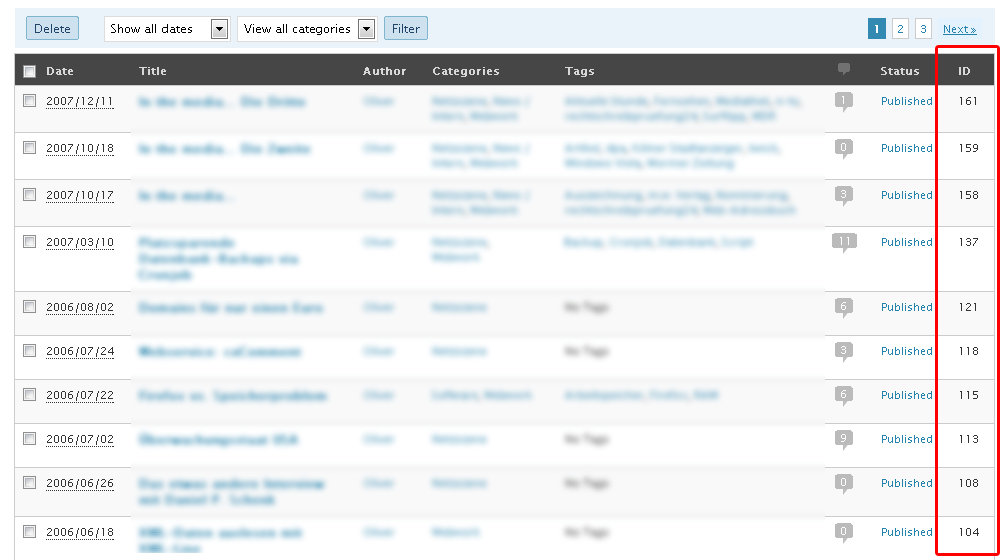
What this plugin does is to reveal most removed entry IDs on admin pages, showing the entry IDs, as it was in versions prior to 2.5
Features
- Reveals hidden IDs that have been removed in WP 2.5
Screenshots
-
- WP 2.5 Manage Posts View

Vielen Dank… die Beiträge haben meine Probleme behoben.
Weiter so !!!
plugin work very fine ,
i am using wp ecommerce http://wordpress.org/extend/plugins/wp-e-commerce/
like to know how to see ids for those product post ,
those product use post system to display items
Thanks In Advance
The plugin doesn’t support WP-Ecommerce yet. You can see the ID while hovering over an item and look at the url in the browser’s status bar.
I love your plugin, thank you.
Might you be able to help me figure out why in the WordPress settings the “http://mydomain.tld?resource=clipboard.gif” image link is broken?
I’ve completely deleted and reinstalled the plugin to no effect, including clearing out the ridwpa database entries prior to re-installation. It’s working fine on all of our other WordPress installs on the same web server.
Thank you.
Hey Kirk,
can you link the URL to your blog so I can check the image link myself?
What browser are you using to test it?
Thank you for your reply, Oliver. For some reason, the small icon is now showing. Perhaps some kind of browser caching factor, even though I cleared cache.
Glad it’s working now. 🙂
unfortunately it doesn’t work with custom post types or taxonomies :-/ do you think supporting it in next releases? thank you
It probably will. 😉
Definitely believe that which you said. Your favorite justification seemed to be on the net the simplest thing to be aware of. I say to you, I definitely get annoyed while people consider worries that they plainly don’t know about. You managed to hit the nail upon the top and defined out the whole thing without having side effect , people can take a signal. Will likely be back to get more. Thanks
I came to your page and noticed you could have a lot more hits. I have found that the key to running a popular website is making sure the visitors you are getting are interested in your niche. There is a company that you can get traffic from and they let you try the service for free. I managed to get over 300 targetted visitors to day to my site. Visit them today: http://nsru.net/048o
Hi
Is your plugin working for PHP5.4 ? My host just updated with this and now I notice that my category posts are showing up in places where I’ve set their ID not to.
oh, sorry, in case you need it, my site is http://the-labyrinth.com
I’m experiencing an issue with the Revel ID plugin. When I activate the plugin. I can see the IDs for Pages but when I go to view Posts the list of Posts I’ve created disappear from the panel. They are still there, however I’m just unable to see them. If i refresh the page. They appear for a second and disappear again.
When I deactivate the plugin the list of Posts reappear as normal. When reactivated the list disappears again. I’ve uninstalled and reinstalled the plugin with the same results. Has anyone else experienced this? Know a fix or a workaround? The website is http://www.nleephotos.com/wordpress
Thanks!
Is this available via github? I would like to add it as a git submodule to my project for easier maintenance.
Hi Michelle, here you go: https://github.com/AlphawolfWMP/reveal-ids
Thank you!
Installed the plugin, no options and no IDs, does this work anymore ?
It does for me. What WP version are you using?
Hi,
The wordpress plugin Reveal ID’s suddenly stopped working on only one of my 3 sites. It could have been with the 4.5 update as it screwed up other plugins too. I have uninstalled, deleted and reinstalled. It shows post ID’s but not category ID’s and these are really the ones I need to see. Could you offer any assistance please?
Hi Graeme,
Reveal IDs is working with WP 4.5.x so most probably another plugin in your installation is causing the issues. May you please provide a list of plugins (names) you have installed in your WP installation that’s having issues? Thank you!
Hi Oliver,
I want to install your plug-in on my main site, but I wanted to test it first in my beta site. When I installed it, it looks like it was going to fit in perfectly with my live site, but then I noticed this weird spacing issue in my categories area that’s now due to the addition of Reveal IDs and it essentially doesn’t fit all the contents within the box anymore. I have a picture to share with you to show the issue and I was wondering if there’s anything that you can do or that can be done in general?
Hi Morgan, may you please link/share the screenshot? Thank you!
This plugin was hard to find. I searched far and wide. But I am so happy I found it! It has made my life so much easier!
Thank you!